This incremental update will be available first to registered users, but will be posted for download by potential customers later this month.
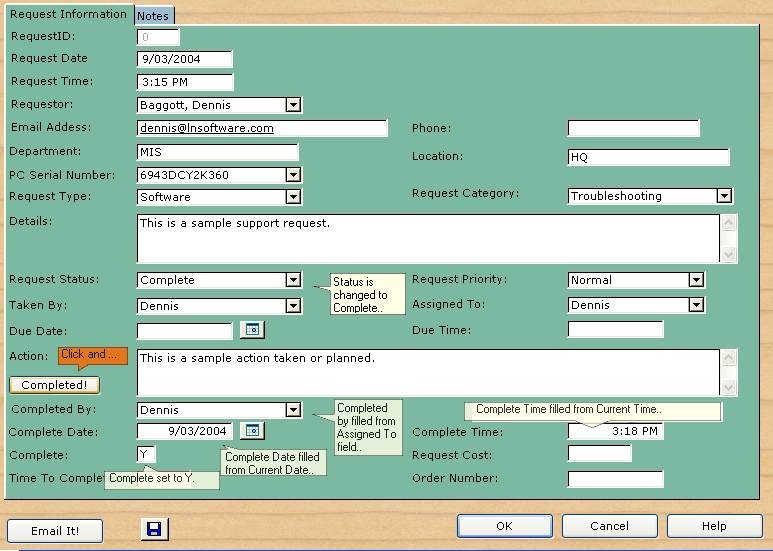
This new incremental upgrade adds a feature that has been appreciated by users of the latest version of the AccessAble Help Desk Pro Edition. A "completed" button now fills multiple fields with one click. Also, note on the screen below that I have added a drop down list for the Complete By field, looked up from the technicians table.
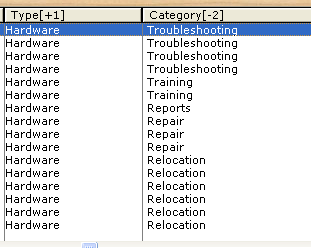
Multiple column sorting is now available by holding the control key while clicking on column headers. The order of the sorts is indicated by a number. Ascending order is indicated by a + sign while descending is indicated by a - sign. Earlier versions allowed for only sorting on one column at a time. 2.15 allows for multiple column sorts as shown below.
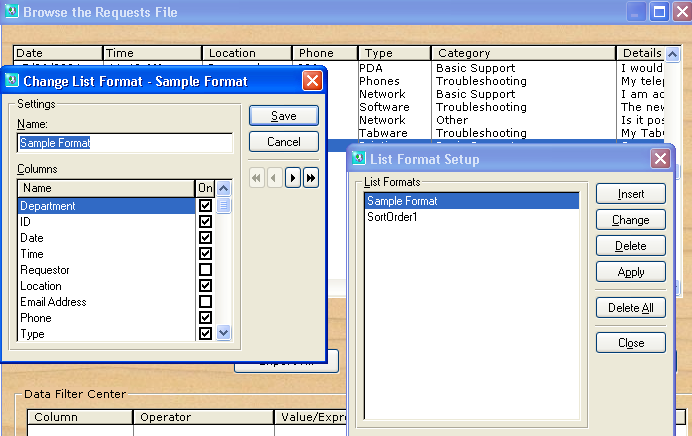
The new version allows you to easily hide columns and move columns up or down in the list as shown below. The list formatter is called by right clicking on the browse screen. Hiding a column is just a matter of clearing a check box. You can even save different list format styles.
The new data filter is shown below. Although some users may always prefer to use the Query Wizard, the data filter center let's you drag and drop columns to quickly add filter conditions. The filters you created can be saved and reused.
Although the default is to AND conditions together to let you drill down on your data, you can also use the OR operator to check for either one condition or another.
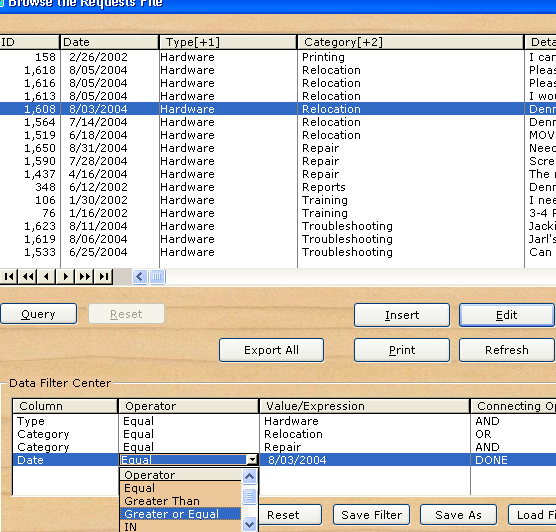
Finally, notice the addition of an Export All button. This will let you output the records as sorted and filtered directly to Microsoft's Excel. Some may find this easier than the Spreadsheet Wizard.