Contents
- Index
- Previous
- Next
Import Calls
Import Calls form ASCII - CSV Format File
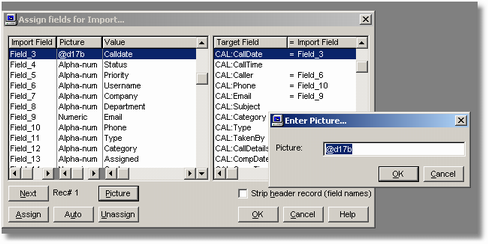
This procedure will let you import calls for support from an ASCII (text) file in comma separated values format. After selecting the import file, it is just a matter of dragging and dropping files from the source to the target. In the case of Date fields, you will need use a PICTURE function of @d17b and in the case of Time fields use a PICTURE format of @t7b